
We have all had the bad technical managers… the ones who tell you to go and do something… and then micromanage the task they have “delegated” to you.
They are a pain to work for.
One of the qualities of a good manager is to tailor their delegation to the people they are delegating to.
So they task Gillian, a senior engineer, with “writing some smoke tests to verify that the application works when deployed to the app server” and they are happy to let Gillian work within that scope because they trust that Gillian will come back to seek clarification if the description is lacking, or if there are issues down the road.
There are two ways to build a Maven project with Jenkins*
Use a free-style project with a Maven build step
Use a Maven-style project
The first way runs the build as Maven intended. The second way adds a whole lot of hooks and can even modify the build in ways that Maven did not intend.
The first way requires that you configure stuff yourself. The second way tries to “guess” what you want and auto-configure it.
I was given a link to yet another article preaching about how 100% code coverage is the only goal (the article is preaching, not Tatu BTW)
There is an issue I have with how the 100% coverage advocates present their argument, but we’ll get to that later.
The case for 100% coverage is put quite simply:
Anything less than 100% coverage means that there are some lines in your code that are untested, and are you seriously willing to let code be released without being tested?
For use when you have multiple JVM providers (Apple & Oracle), you want to be able to switch between JDKs for each CLI
usejava ()
{
    local sel=$1.jdk
    if [ -x "/Library/Java/JavaVirtualMachines/jdk$sel/Contents/Home/bin/java" -a ! -x "/Library/Java/JavaVirtualMachines/$1/Contents/Home/bin/java" ]
    then
        sel=jdk$sel
    fi
    local base=/Library/Java/JavaVirtualMachines
    if [ -x "/System/Library/Java/JavaVirtualMachines/$sel/Contents/Home/bin/java" ]
    then
        base=/System/Library/Java/JavaVirtualMachines
    fi
    if [ -z "$1" -o ! -x "$base/$sel/Contents/Home/bin/java" ]
    then
        local prefix="Syntax: usejava "
        for i in /Library/Java/JavaVirtualMachines/* /System/Library/Java/JavaVirtualMachines/*
        do
            if [ -x "$i/Contents/Home/bin/java" ]
            then
                /bin/echo -n "$prefix$(basename $i | sed -e "s/^jdk//;s/\.jdk$//;")"
                prefix=" | "
            fi
        done
        /bin/echo ""
    else
        if [ -z "$JAVA_HOME" ]
        then
            export PATH=$base/$sel/Contents/Home/bin:$PATH
        else
            export PATH=$(echo $PATH|sed -e "s:$JAVA_HOME/bin:$base/$sel/Contents/Home/bin:g")
        fi
        export JAVA_HOME=$base/$sel/Contents/Home
        echo -n -e "\033]0;$(java -version 2>&1 | sed -e "s/.*\"\(.*\)\".*/Java \1/;q")\007"
    fi
}
There is additional fun to be had, given that most Java based launchers that try to fix JAVA_HOME when not set will guess the Apple JVM path… so the following Java program can help
http://j.mp/TfdoxL a link to a free online iOS app development training course that looks worth checking out
Special Symbols and Characters on the regular Mac Keyboard
These are for the British Keyboard layout
Currency Symbols
| Symbol | Key combination |
|---|---|
| $ dollar | Shift+4 |
| ¢ cents | Option+4 |
| £ pound | Shift+3 |
| ¥ yen | Option+y |
| € euro | Option+2 |
Trademark and Copyright Symbols
| Symbol | Key combination |
|---|---|
| © copyright | Option+g |
| ® registered | Option+r |
| ™ trademark | Option+Shift+2 |
Apple Symbol
| Symbol | Key combination |
|---|---|
| apple | Option+Shift+K |
Math and Greek Character Symbols
| Symbol | Key combination |
|---|---|
| ± plus-or-minus | Option+Shift+Equals |
| µ micro | Option+h |
| π pi | Option+l (as in L is for llama) |
| √ square root | Option+t |
| ÷ divided by | Option+/ (slash is key to the left of right-hand shift key) |
| · middle dot | Option+Shift+9 |
| ≈ almost equal | Option+x |
| ≠ not equal | Option+= |
| ∞ infinity | Option+Shift+T |
| ≤ less than or equal | Option+, (comma) |
| ≥ greater than or equal | Option+. (period) |
| Å Angstrom sign | Option+Shift+K, Shift+A |
| ∑ summation sign | Option+Shift+F |
| ° degree sign | Option+Shift+0 (zero) |
| ∂ partial differential | Option+d |
| ∫ integral | Option+Shift+D |
| Ω Omega | Option+Shift+Z |
Copyediting, typesetting, and miscellaneous symbols
This is a repost of my post on the CloudBees Developers blog
TL;DR Source control injection attacks are a bigger worry than build tool injection attacks, and if you cannot trust your local filesystem, then you cannot trust anything.
A few exchanges on twitter have prompted me to write a fuller blog post on the subject of Cross-Build Injection (XBI) Attacks.
The idea of XBI is that you trick the developer and replace parts of their code with your code, thereby getting your code to be trusted by the developer.
Hamlet: … for there is nothing either good or bad, but thinking makes it so.
— Hamlet Act 2, scene 2, 239–251, William Shakespeare
The Apache Software Foundation is a meritocracy. By this we mean that you gain status based on the merit of your work and actions. In fact the status that you gain is a recognition of the merit of your work and actions.
Maven is an Apache project, that means that we have to follow the Apache rules and way. One of those rules is that we cannot hand out commit access to anyone who asks for it.
With Java Generics, it can be useful to insert wildcards wherever possible, but how do you decide which wildcard is correct? When do you use ? super T, ? extends T and when should you not use a wildcard at all.
The Get and Put principle: Use an
extendswildcard when you only get values from the structure. Use asuperwildcard when you only put values into the structure. Don’t use a wildcard when you both get and put values from/into the structure.
Cmd+Shift+4 followed by Space is a lovely way to get a screen shot of a window on an Apple Mac…
In fact here is one such screenshot:
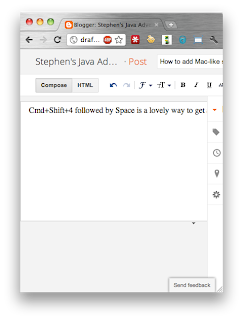
Notice the nice shadow effect around the screenshot? Ever wanted to add that shadow effect to your non-mac screenshots?
ImageMagick is your friend
convert NoShadowScreenshot.png \( +clone -background black -shadow 80x20+0+15 \) \
  +swap -background transparent -layers merge +repage WithShadowScreenshot.png
There you are, nice equivalent shadow added.